3D Winter Deer Shadow Box SVG
Crafting Depth and Dimension with Digital Design
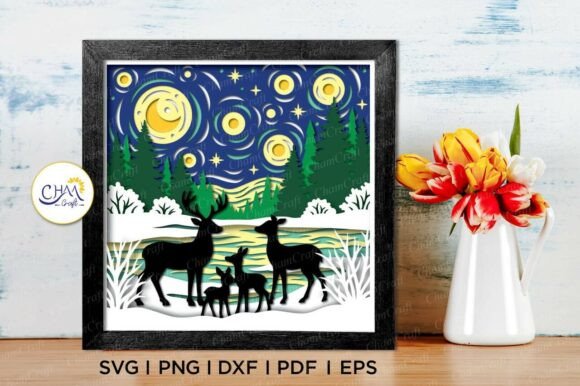
For creators working with digital cutting machines like Cricut or Silhouette, the 3D Winter Deer Shadow Box SVG offers a compelling way to bring layered, dimensional artistry into physical form. This digital template is designed to be cut and assembled into a shadow box that visually mimics a 3D scene—perfect for seasonal decor, handmade gifts, or small business product lines.
At its core, this SVG file is more than just an image. It’s a structured design that uses layered cut pieces to create depth when placed in a lightbox or mounted against a contrasting background. The 8×8 inch base size provides a manageable canvas for both beginners and experienced crafters, while still allowing for intricate detailing that brings the winter deer scene to life.
Understanding the File Structure
The 3D Winter Deer Shadow Box SVG package includes multiple file formats—SVG, DXF, EPS, PDF, PNG, and a native Silhouette Studio file. This ensures compatibility across a wide range of design software and cutting machines. Whether you're using Cricut Design Space, Silhouette Studio, or Adobe Illustrator, you’ll find a format that works for your workflow.
- SVG is ideal for use with Cricut and Silhouette machines
- DXF works with Silhouette Studio and other CAD software
- EPS is best suited for vector-based programs like Illustrator
- PNG with a transparent background is useful for visual planning or hand-cutting
All files are included in a compressed ZIP folder. Users should extract the files before importing them into their preferred design or cutting software. A basic understanding of how to handle digital cutting files is recommended before purchase, especially if you're new to layered paper projects.
Design Considerations and Practical Tips
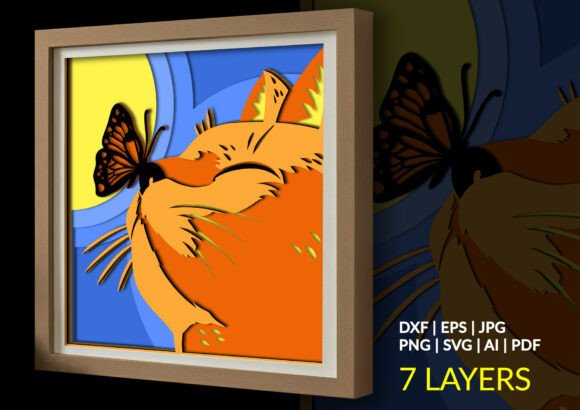
One of the standout features of the 3D Winter Deer Shadow Box SVG is its layered composition. Each layer corresponds to a different depth plane in the final assembled box, allowing light to pass through and cast soft shadows that enhance the 3D effect. This makes it a powerful tool for creating visually engaging art pieces without requiring advanced sculpting or modeling skills.
However, scaling the design can impact the final result. While it’s possible to resize the SVG file to fit different projects, caution is advised when reducing the dimensions. Finer details—like the deer’s antlers or snowflake accents—can become too small to cut accurately, especially on machines with limited precision or when using thicker materials.
For best results, consider the following:
- Material choice: Use lightweight cardstock or thin chipboard for easier layering and assembly.
- Color experimentation: Try different color combinations to match seasonal themes or brand palettes.
- Backlighting: The shadow box effect is most striking when backlit. Consider using LED strips or placing the finished piece near a window.
Applications Across Creative and Commercial Use Cases
This design isn’t just for hobbyists. Its versatility makes it a valuable asset for a variety of applications:
- Personal crafting: Create custom holiday cards, wall art, or seasonal decorations.
- Small business owners: Add ready-to-assemble shadow box kits to your product lineup or use the design in custom home decor items.
- Educators: Use the file in design or art classes to teach students about layering, depth, and digital-to-physical workflows.
- Marketers and bloggers: Incorporate the design into seasonal campaigns or DIY content to engage audiences with hands-on projects.
In a commercial context, the 3D Winter Deer Shadow Box SVG can be used to create branded holiday cards, promotional items, or even limited-edition prints that customers can assemble themselves—adding a tactile and memorable element to your marketing efforts.
Maximizing the Design’s Potential
While the file is ready to use out of the box, there’s room for customization. Designers familiar with vector editing software can tweak individual layers, add text, or modify the background to suit specific themes or branding needs. This flexibility enhances its value, especially for those who want to create variations for different holidays or events.
For example, the winter deer theme could be adapted into a spring or autumn version by changing color schemes and minor design elements. Similarly, the layered structure can be repurposed for other subjects—birds, trees, or abstract shapes—using the same 3D shadow box technique.
What to Watch Out For
Because this is a digital product, it’s important to understand what you’re purchasing before checkout. No physical item will be shipped. The design is delivered as a ZIP file containing all relevant formats, and users are expected to know how to work with these files in their preferred software.
If you're unfamiliar with SVG files or layered paper cutting, it may be worth practicing with simpler designs first. Also, keep in mind that while the file is optimized for 8×8 inch output, resizing can affect both aesthetics and functionality. Always test cuts on scrap material before committing to your final piece.
Final Thoughts
The 3D Winter Deer Shadow Box SVG is more than a decorative file—it's a tool for creative expression, a resource for small businesses, and a teaching aid for educators. Its layered structure allows for a unique blend of digital design and hands-on crafting, making it a standout option for anyone looking to add depth and dimension to their projects.
Whether you're crafting for pleasure, creating content for your blog, or designing products for your shop, this SVG template offers a versatile and visually striking way to bring your ideas to life. With the right materials, a bit of patience, and a willingness to experiment, you can turn a simple digital file into a stunning, three-dimensional piece of art.