3D Wall Shelves Bundle Laser Cut: A Practical Design Resource for Makers and Creators
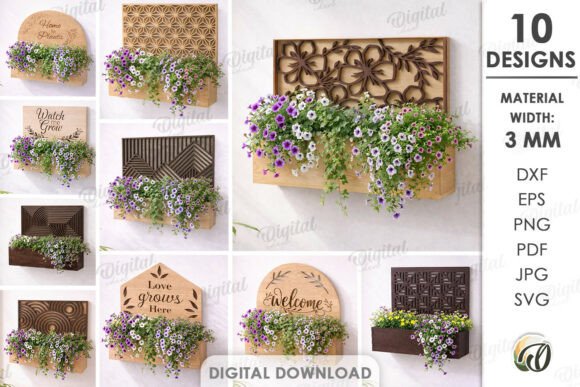
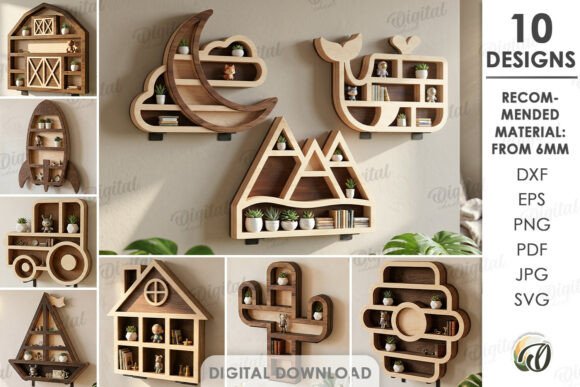
The 3D Wall Shelves Bundle Laser Cut is a digital design package tailored for individuals who want to create custom wall shelves using laser cutting technology. It includes 10 ready-to-use designs in multiple file formats—SVG, DXF, EPS, PDF, JPEG, and PNG—making it compatible with a wide range of laser cutting machines and design software. This digital product is ideal for makers, designers, and DIY enthusiasts who are looking to add unique, functional elements to their living or working spaces without the need for physical materials to be shipped.
How the 3D Wall Shelves Bundle Fits Into Your Creative Workflow
Whether you're a professional designer, a small business owner, or a hobbyist working on a personal project, the 3D Wall Shelves Bundle Laser Cut can be integrated seamlessly into your existing workflow. The digital nature of the product means it can be used immediately after purchase, eliminating delays associated with shipping or sourcing physical materials. You can import the files directly into your preferred design or laser cutting software and begin production right away.
Before starting a project, it's helpful to visualize how the final product will fit into your space. The included image previews serve as inspiration, allowing you to choose a design that complements your interior style. Once a design is selected, you can modify the file in vector editing software to adjust dimensions, add custom elements, or adapt the pattern to your specific material constraints.
Using the Bundle in Real-World Applications
These laser-cut shelf designs are not limited to home décor. They can be used in a variety of settings, including:
- Home offices for organizing books, electronics, and stationery
- Living rooms as artistic display shelves
- Workshops or studios for storing tools and supplies
- Retail spaces for product displays
Because the files are scalable and editable, they can be adapted to different materials and thicknesses, though a material width of 6mm is recommended for optimal structural integrity and visual appeal. This flexibility makes the bundle a valuable asset for anyone involved in interior design, furniture making, or commercial space planning.
Compatibility and Technical Considerations
The 3D Wall Shelves Bundle Laser Cut is designed with compatibility in mind. Whether you're using Adobe Illustrator, Inkscape, AutoCAD, or a laser cutter control interface like LightBurn or RDWorks, the multi-format files ensure smooth import and editing. This allows users to work within their preferred tools without additional conversion steps.
Before cutting, it's important to verify that your laser machine supports the file types and that your material dimensions align with the design specifications. Testing with scrap material is also a good practice to confirm alignment, depth, and overall fit before cutting your final piece.
Preparation and Organization for Efficient Production
Successful implementation of the 3D Wall Shelves Bundle Laser Cut begins with proper preparation. Here are a few steps to streamline your workflow:
- Review all included files: Understand which file types are best suited for your software and laser cutter.
- Organize your workspace: Ensure your machine is calibrated and your material is properly secured.
- Do a test run: Cut a small section or use a similar material to confirm settings before committing to your final piece.
- Plan for assembly: Some 3D shelf designs may require interlocking pieces or brackets—make sure you understand the assembly process before cutting.
By taking these steps, you’ll reduce material waste, save time, and improve the overall quality of your finished shelves.
Quality Control and Long-Term Use
One of the advantages of using a digital design bundle like this is the ability to maintain consistency across multiple projects. Because the files are reusable and editable, you can replicate the same shelf design for different clients, rooms, or events while ensuring a uniform look and feel.
For long-term use, it’s wise to store the files in an organized digital archive. Label them clearly, include notes on material preferences and machine settings, and back them up to cloud storage or an external drive. This helps you quickly retrieve and reuse the designs in future projects without needing to reconfigure settings or search for misplaced files.
Integration with Other Tools and Resources
The 3D Wall Shelves Bundle Laser Cut works well alongside other digital and physical tools. For example, if you use a project management app like Trello or Asana, you can integrate laser cutting tasks into your design workflow, tracking progress from concept to completion. Designers who work with 3D modeling software like SketchUp or Fusion 360 can import the 2D vector files and extrude them into full 3D models for client presentations or structural testing.
Additionally, the bundle can be combined with other digital design assets—such as decorative patterns, engraving templates, or modular furniture kits—to create more complex and personalized interior elements. This level of integration supports a more cohesive and efficient creative process.
Practical Tips for Getting the Most Out of the Bundle
Here are a few practical suggestions to help you maximize the value of the 3D Wall Shelves Bundle Laser Cut:
- Customize the designs: Don’t feel limited to the original layouts. Use vector editing tools to scale, rotate, or combine elements to create a one-of-a-kind shelf.
- Experiment with materials: While 6mm is the recommended thickness, you can try different materials like acrylic, MDF, plywood, or even metal (depending on your laser machine’s capabilities).
- Batch production: If you're making multiple shelves, use the nesting feature in your laser software to arrange multiple pieces on a single sheet of material, reducing waste and increasing efficiency.
- Document your process: Take notes on what worked well and what didn’t. This will help you refine your approach for future projects.
Conclusion: A Flexible and Functional Design Tool
The 3D Wall Shelves Bundle Laser Cut is more than just a collection of digital files—it’s a flexible tool that supports creativity, efficiency, and personalization in design projects. Whether you're outfitting a new home office, building a custom bookshelf, or creating display units for a retail space, this bundle provides the foundation for professional results without the need for physical inventory.
By understanding how to integrate the bundle into your workflow, preparing your materials and tools effectively, and leveraging its compatibility with other design resources, you can create beautiful, functional wall shelves that stand out. The key is to treat it as part of a broader creative process—one where planning, execution, and refinement all play a role in achieving the desired outcome.